Ship to servers you own.
A self hosted deploy platform for solo developers and small teams. One command puts it on your VPS or homelab box, and each release is checked before it takes traffic.
Install now
curl -fsSL https://nebulactrl.com/install.sh | sudo bash- v0.1.1
- Free to use
- amd64 and arm64
- Debian 12 and 13
- Ubuntu 22.04 to 26.04
- Rocky and Alma 9
- 1 GB RAM
Uninstalling leaves your containers running. Read the script first if you like, or read the docs.
An alternative to Railway, Coolify and Dokploy. Compared row by row.
$ curl -fsSL https://nebulactrl.com/install.sh | sudo bash
==> Checking the system
    ok  Debian GNU/Linux 12 (bookworm), arm64, systemd
    ok  16040 MB RAM
==> Base packages
    ok  installed: gnupg
==> Docker Engine
        installing Docker Engine from Docker's official repository ...
    ok  Docker Engine installed
    ok  Docker 29.9.2, Compose 5.6.1
==> Plan
    warn 203.0.113.10 is a private address: the dashboard will only be reachable from your network, and servers outside it cannot connect (use --public-ip or a domain).
    ok  mode: ip, dashboard: http://203.0.113.10:8000
        no domain given: the dashboard is served over plain HTTP (see the notice at the end)
==> Docker daemon defaults
    ok  wrote /etc/docker/daemon.json
    ok  Docker restarted with the new defaults
==> Edge network
    ok  created nebulactrl-edge
==> Installation files in /opt/nebulactrl
    ok  generated secrets in /opt/nebulactrl/.env (0600)
    ok  backup directory /var/backups/nebulactrl
==> NebulaCtrl image
    ok  loaded nebulactrl:instlocal from /root/image.tar
… 7 more steps and 35 lines, skipped in this replay
================================================================
 NebulaCtrl is installed
================================================================
 Dashboard : http://203.0.113.10:8000
 Setup URL : http://203.0.113.10:8000/setup?token=<token>
             open it to create the admin account (the token works once, until setup is done)
 Files     : /opt/nebulactrl  (.env holds every secret, mode 0600)
 Backups   : /var/backups/nebulactrl/control-plane (daily 03:30 UTC)

 MUST DO NOW: back up the secret key
   sudo grep NEBULACTRL_SECRET_KEY /opt/nebulactrl/.env
   Store it in a password manager, apart from the backups. It exists nowhere else;
   without it the database and its backups cannot be read.
… 14 more lines of notices, skipped in this replay

Every line is the installer's own output. The replay skips the long middle; the real run took 1 min 4 s.Installed. This is the canvas it opens on: Acme Shop with three services, each live.
0of 378 requests dropped
A rolling deploy under load, v1 replaced by v2
Measured 27 October 2026
64s
Install on a clean Debian 12 machine
Measured 27 October 2026
5.7s
One image deploy, pull to old release retired
Measured 27 October 2026
283MiB
Idle memory: control plane, Postgres and proxy
Measured 27 October 2026
27MB
Agent binary
Measured 27 October 2026
How each figure was measured
- A rolling deploy under load, v1 replaced by v2. Integration test TestZeroDowntimeRolling: one GET every 20 ms (50 a second) through the proxy while the new release replaced the old one. 378 requests, no response other than 2xx, no connection errors, and v1 never answered after v2 took over. Measured on 2026-10-27, MacBook Pro (Apple M1 Pro, 32 GB), macOS 27.0.1, Docker 29.8.2 in OrbStack (15.7 GiB VM).
- Install on a clean Debian 12 machine. One run of deploy/install/install.sh in IP mode, with no domain and the image preloaded, timed by its own clock: 64.44 s from the first line to the last. content/install-recording.json is that run. Measured on 2026-10-27, Debian 12 (bookworm) arm64, 16 GB RAM, clean machine.
- One image deploy, pull to old release retired. The deployment_events timestamps of one rolling deploy of traefik/whoami (image already on the host), read from GET /deployments/{id}/events: 5.657 s in total, with the route moving at 3.39 s. content/deploy-recording.json is that run. Measured on 2026-10-27, MacBook Pro (Apple M1 Pro, 32 GB), macOS 27.0.1, Docker 29.8.2 in OrbStack (15.7 GiB VM).
- Idle memory: control plane, Postgres and proxy. The installer's own compose file with the image built from the root Dockerfile, one project and three services, idle. docker stats, median of five samples: control plane 209.7 and Postgres 52.7, plus the proxy container of a running agent at 20.1. Measured on 2026-10-27, MacBook Pro (Apple M1 Pro, 32 GB), macOS 27.0.1, Docker 29.8.2 in OrbStack (15.7 GiB VM).
- Agent binary. Built the way the release builds it: CGO_ENABLED=0 GOOS=linux GOARCH=amd64 go build -trimpath -ldflags "-s -w" ./cmd/agent. 27,234,464 bytes (arm64: 24,772,768). Measured on 2026-10-27, MacBook Pro (Apple M1 Pro, 32 GB), macOS 27.0.1, Docker 29.8.2 in OrbStack (15.7 GiB VM).
Press Deploy, then break it.
Replay a healthy release, then a deployment whose health check never passes. The new container starts beside the old one and the agent checks it from outside, so your image needs no curl. Until that check passes, the old release keeps serving. How deployments work
A replay of a recorded deployment of web, 5.7 s in all, shown at the pace it ran. A rolling deploy: the new container starts beside the old one.
Internet
shop.localhost
- Current release100
- New release0
Serving the current release.
- 0.1Pull image started
Pulling traefik/whoami:latest - 0.4Pull image succeeded
- 0.5Create container started
Creating container nc-web-f9db9596-0 - 0.9Create container succeeded
- 0.9Start container started
- 1.0Start container succeeded
- 1.0Health check started
Checking health (http) - 3.1Health check succeeded
- 3.2Move the route started
Updating proxy routes - 3.4Move the route succeeded
- 3.4Verify through the proxy started
Verifying http://shop.localhost/ through the proxy - 3.4Verify through the proxy succeeded
- 3.4Retire previous release started
Retiring previous release - 5.6Retire previous release succeeded
Traffic moves only after the new container passes its checks.

- Failed
The health check does not pass
The new container is removed and the old release keeps serving. The deployment names the step and keeps the last 50 log lines.
- Rolled back
The check through the proxy fails
The previous route is put back and the new container is removed. Cancel works at any step until this check passes.
- Succeeded
Every check passes
The old container gets its stop grace period, then is removed.
A rollback redeploys an earlier release's image and configuration. Databases, volumes and external services are not rolled back. Deployments in the docs
Changes wait as a diff until you deploy them.
Variables, domains and settings stage on the canvas. Review the diff, discard one change, or deploy them together in dependency order. Click a service and the inspector holds its releases, logs, variables and metrics. Staged changes in the docs


Servers dial out. Nothing dials in.
Each server runs a small agent, 27.2 MB, that opens a WebSocket to the control plane and keeps it open. A host behind a home router works like a VPS, because the control plane never has to reach it. If the control plane goes down, containers and proxies keep running.
Each agent reports Docker, CPU, memory and disk. Revoke it and its connection closes at once. Adding servers

Add the next server with one command
Servers, then Add server, shows this command with a one time token. The agent enrolls, then reports Docker, CPU, memory and disk.
curl -fsSL https://<your-host>/install-agent.sh | sudo sh -s -- --token <token>What is in the box
350 one click templates, a CLI, an API and everything below, with nothing held back for a paid plan.
Each template pins an image digest and states its licence. Templates in the docs

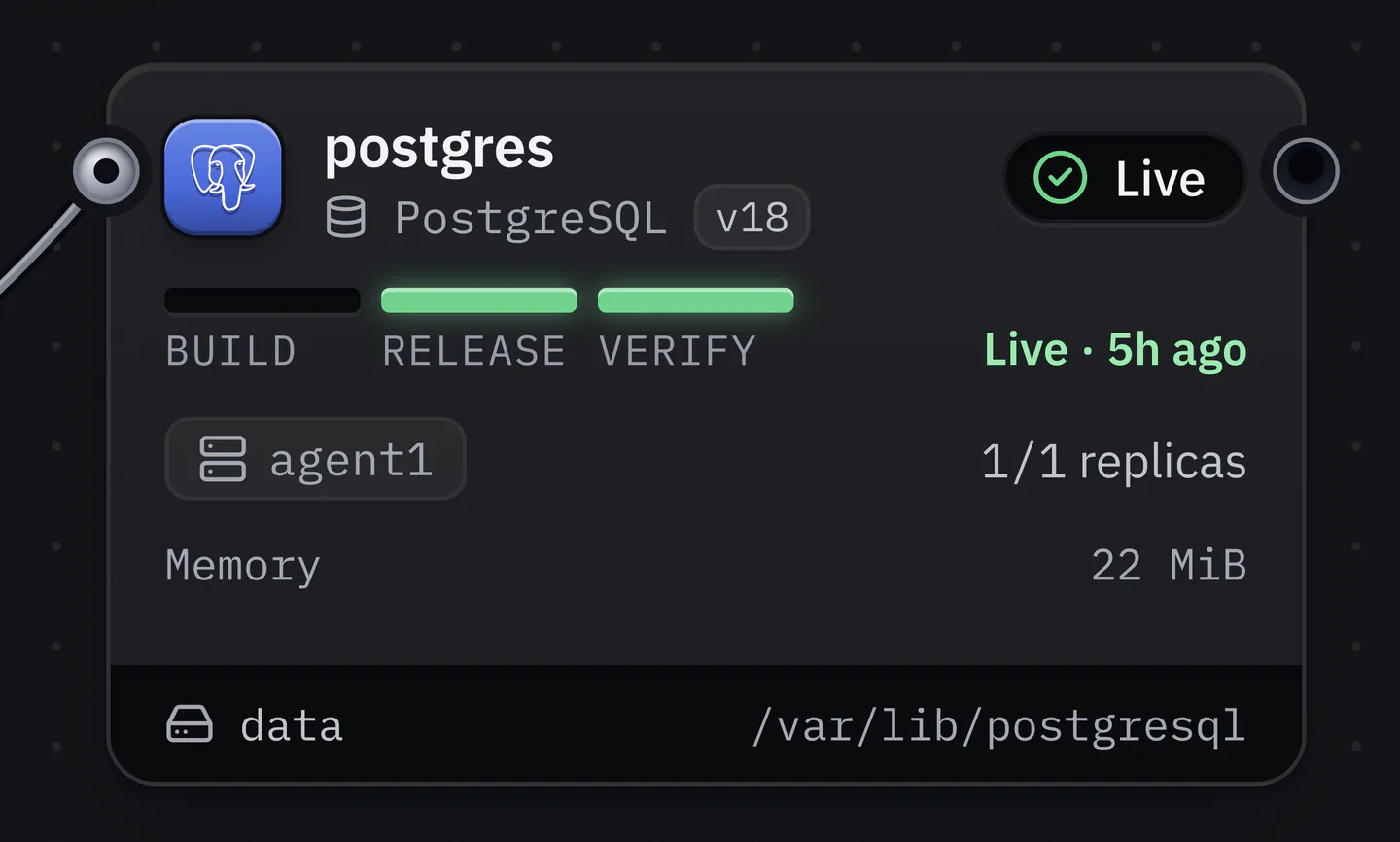
Phases on every service
Build, release and verify, lit on the card.
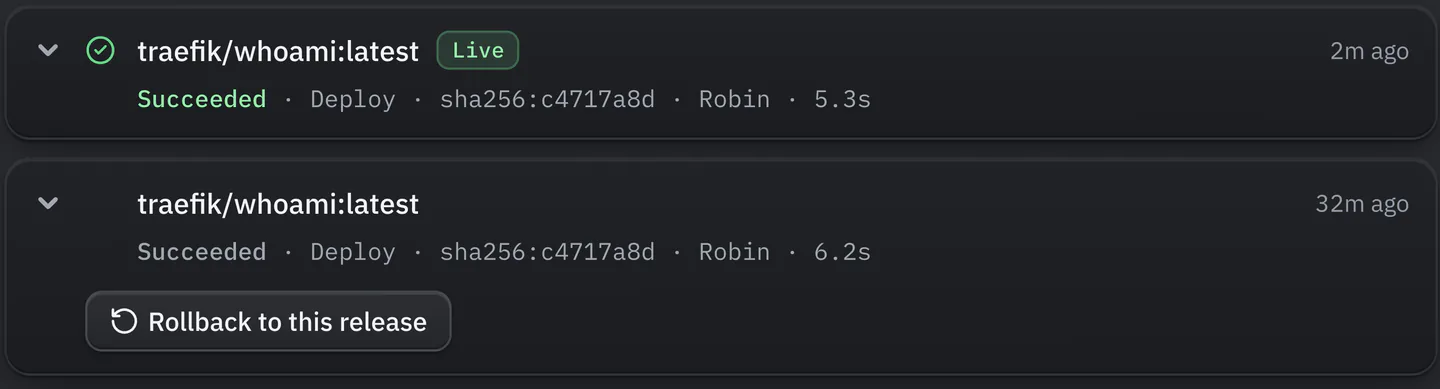
Rollback
Every earlier release has its own rollback button.
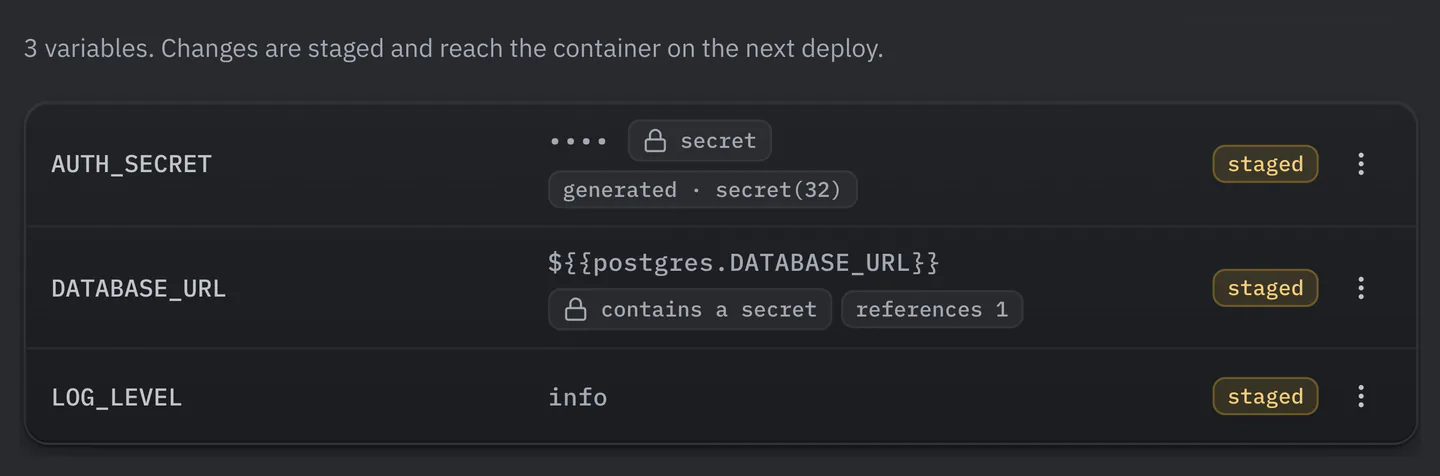
Secrets and references
Secrets stay hidden after you save them. References point at another service.


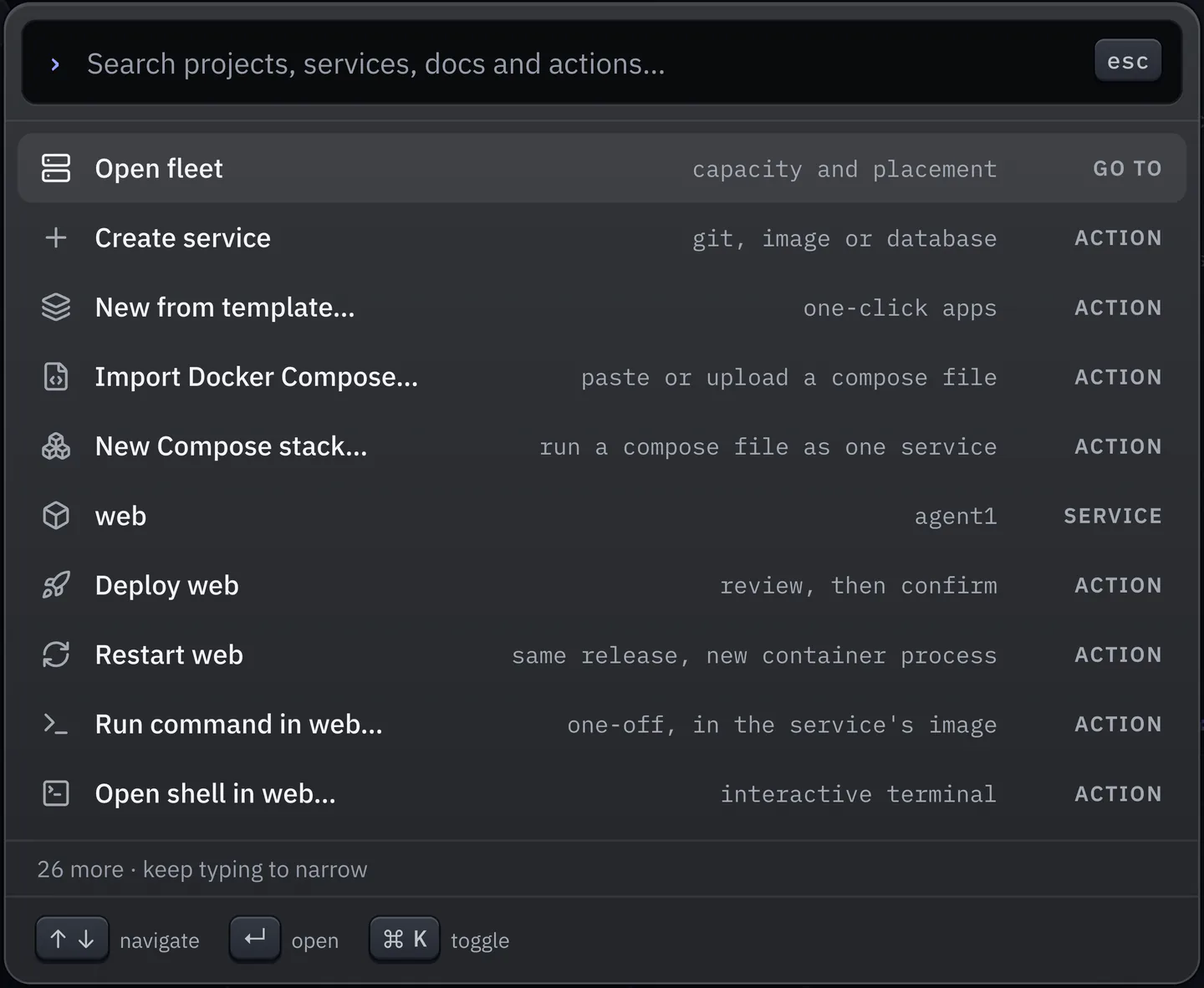
Command palette
Deploy, restart or open a shell from the keyboard.
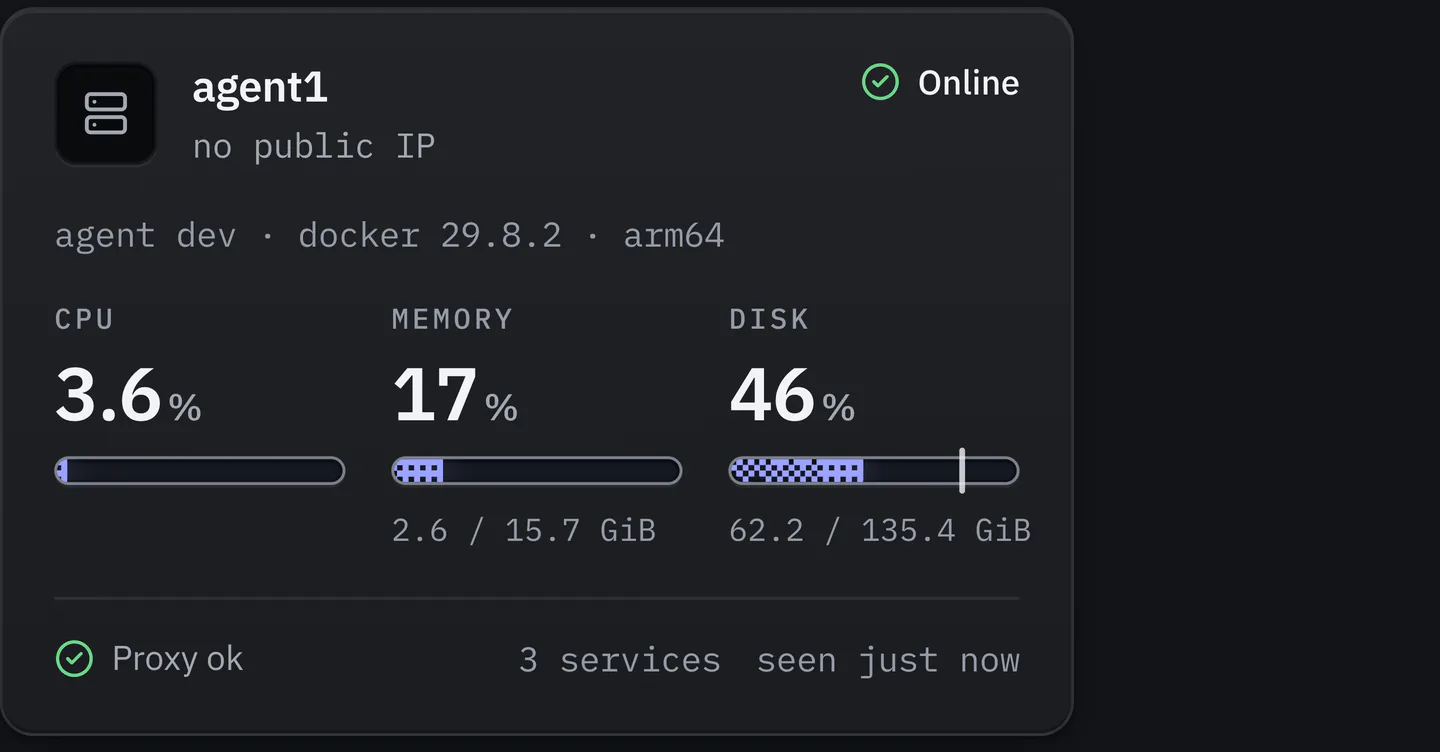
Capacity per server
A server card: CPU, memory and disk from its agent, and the state of its proxy.


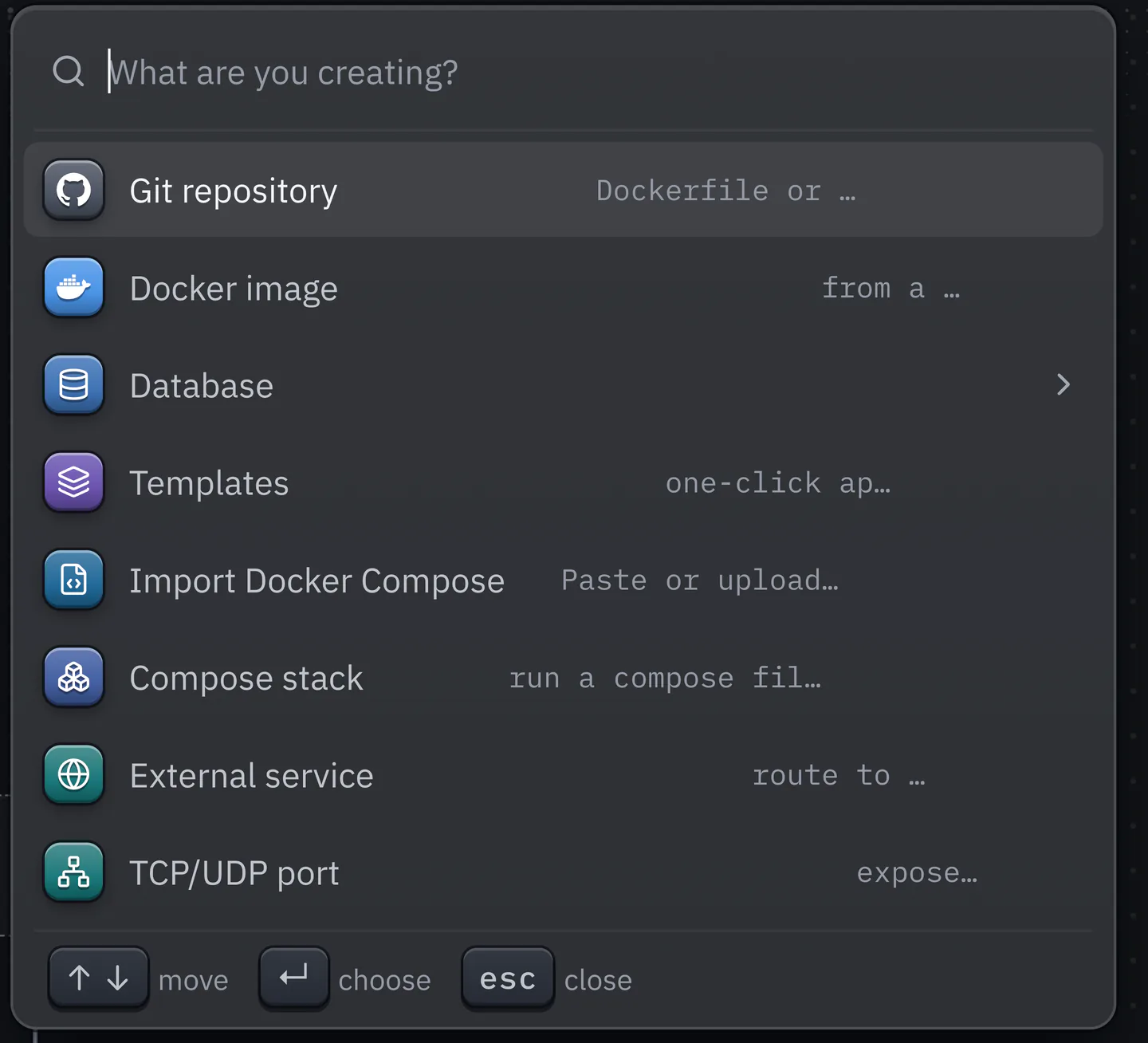
Create menu
Eight ways to add a service.
CLI, API and MCP
A command and an endpoint for everything in the dashboard, an OpenAPI 3.1 document and an optional MCP server.
nebulactrl services deploy web --waitnebulactrl services logs web -f

Ship
- Git push and previews
- Signed webhooks, monorepo watch paths and a preview environment per pull request.
- Compose stacks
- A docker-compose.yml runs as one stack under a safe allow list.
Run
- Databases
- PostgreSQL, MySQL, MariaDB, Valkey, Redis, MongoDB and ClickHouse with backups to S3.
- Volume backups
- restic backups for any service's volumes, restored into a new volume.
- Replicas and autoscaling
- One to ten replicas behind the proxy, with a CPU target.
- Tasks, logs and shell
- Scheduled tasks, stored logs with drains to Loki or syslog, and a shell in any container.
Reach
- Cloudflare and Tailscale
- A managed Cloudflare Tunnel and DNS per server, and a Tailscale or Headscale sidecar per service.
- Isolated environments
- One network per environment on a host, and outbound traffic blocked per service.
- Traffic analytics
- Requests, status classes and origins, counted by the agent. Raw log lines never leave the host.
Trust
- Teams and sign in
- Passkeys, TOTP, any OIDC provider and GitHub login, 4 roles and an audit log. All free.
- Hardened hosts
- A Lynis audit per server with reversible safe fixes.
- Notifications
- Email, Slack, Discord, Telegram and signed webhooks.
One command, then a dashboard.
The installer prints every step it takes. It adds Docker only if it is missing, keeps the daemon settings you already have, puts Postgres on a private network and schedules a daily backup. It ends by telling you to copy the key it generated, because without that key the backups cannot be read.
Add --domain and the dashboard comes up over HTTPS with a Let's Encrypt certificate. Without it you get plain HTTP on port 8000, with a notice that says why that is only for trying things out. Every step and every flag
NebulaCtrl sends no telemetry and does not check for updates. We keep it that way.
Install
Run the command above on a Debian, Ubuntu, Rocky or Alma host. Every secret is generated and the dashboard comes up.
Add a server
Optional. Skip it to deploy on the first machine.
Deploy
Point a service at a Git repository, a Compose file, a template or an image and press Deploy, or run it from CI. The quickstart adds a domain and a database.
nebulactrl services deploy web --waitThe 15 steps, as recorded on a clean Debian 12 machine. Times are the recording's clock, where long waits are capped, so they add up to 33 s; the real run took 1 min 4 s.
Prepare the host
Docker, its daemon defaults and the edge network.
Checking the system
Debian 12, arm64, systemd, 16 GB of RAM.
under 0.1 s
Base packages
Installs gnupg, the one package it needs first.
2.6 s
Docker Engine
Installs Docker Engine and Compose from Docker's own repository.
5.9 s
Plan
Prints the mode and the dashboard address before it changes anything else.
under 0.1 s
Docker daemon defaults
Writes /etc/docker/daemon.json and restarts Docker.
0.6 s
Edge network
Creates the
nebulactrl-edgenetwork.under 0.1 s
Start the control plane
Secrets, the image, the control plane and a daily backup.
Installation files in /opt/nebulactrl
Generates the secrets into a 0600 .env and a backup directory.
under 0.1 s
NebulaCtrl image
Loads the control plane image.
1.0 s
Starting the control plane
Starts the control plane and waits until it answers.
3.0 s, capped
Daily
control-planebackupSchedules a daily local backup and keeps 14.
under 0.1 s
Enroll the first server
The agent on this same host.
Agent on this host (the first server)
Installs the agent as a systemd unit and enrolls it as the first server.
3.3 s, capped
Harden the host
Firewall, fail2ban, security updates and a Lynis audit.
Firewall
Enables ufw with SSH, 80, 443 and the dashboard port.
3.7 s
fail2ban (SSH)
Starts fail2ban on sshd.
3.4 s
Automatic security updates
Enables unattended security updates, no automatic reboot.
1.9 s
Lynis hardening audit
Audits the host with Lynis and applies the fixes it can undo.
7.7 s
Where it stands against Coolify, Dokploy and Railway
Behind on
Point in time database recovery, database failover, host bind mounts and Nixpacks, and only a partial answer on private networking across hosts.
Ahead on
Checking a release through the proxy, staged changes with a diff, a network per environment and blocking outbound traffic per service.
Younger
Coolify and Dokploy have larger communities and more years in production.
92of 100
capabilities NebulaCtrl supports, counted from its own code.
- Coolify62 of 100
- Dokploy53 of 100
- Railway49 of 100
Before you install
The objections that stop most installs, answered first.
Is it ready for production?
How is it different from Coolify or Dokploy?
What do I need?
What does the installer change?
--version to pin a release; to go back, run it with the previous version. The uninstaller keeps your apps and data unless you ask otherwise. Read the script before you run it, or see what each step does and how to upgrade and roll back.Try it on a machine you can afford to wipe.
Nothing to sign up for and nothing to pay. Your containers stay plain Docker, your data stays on your disks, and the uninstaller leaves your apps running unless you ask it not to.
curl -fsSL https://nebulactrl.com/install.sh | sudo bash- v0.1.1
- Free to use
- amd64 and arm64
- Debian 12 and 13
- Ubuntu 22.04 to 26.04
- Rocky and Alma 9
- 1 GB RAM